Google Maps Business Copier
Copy visible business listing fields from a Maps panel.
The idea
Google Maps Business Copier is a small utility-sized experiment: take a business listing that is already open in a browser and remove the repetitive work of copying its name, address, phone number and website. It belongs in the portfolio as an exploration of browser automation and extension architecture, not as a large commercial platform. The source supports that narrow workflow directly.
How it works
Open a Maps place panel in a browser that supports the extension's Manifest V2/browser API setup.
Open the extension popup. It checks whether the active tab is a Maps URL before asking the content script to extract fields.
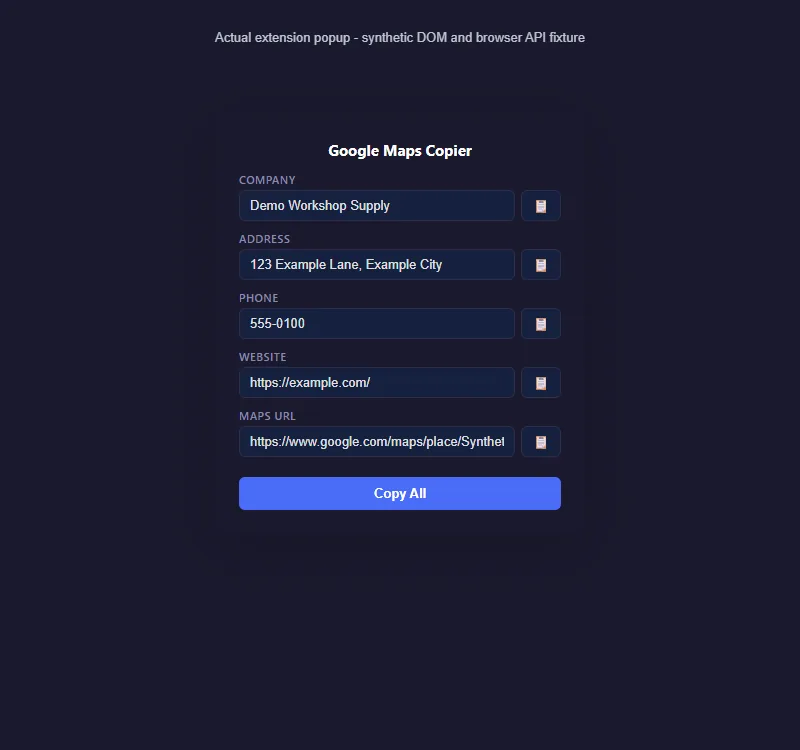
Read or copy individual fields. Copy All assembles address, company and website into one quoted CSV row, escaping internal quotation marks.
The local walkthrough uses the original extraction and popup scripts with synthetic Maps-like DOM elements and a mocked browser message bridge. It does not install the extension against a real listing or collect any real business data.
Inside the build
A content script and a popup with separate jobs
content.js reads DOM elements in the listing page. popup.js controls the user interface and asks the active tab for data through browser.tabs.sendMessage. The manifest declares where that content script may run. This simple separation is the central extension concept: the popup's document does not itself contain the business page, so a message boundary is needed to access the right context.
DOM extraction is practical and fragile
The source looks for a known place-title class, data-item-id attributes for address and phone controls, and a website authority link. It also has fallback text and aria-label parsing. Those choices expose a useful learning topic: selectors make a focused tool possible quickly, but changes to a third-party interface can break them. The existing code is not evidence of an official Maps API integration or durable scraping coverage.
Clipboard output with useful edge cases
The popup fills read-only fields, provides per-field copy buttons and creates a CSV row from a selected subset. Its escaping doubles embedded quote characters before surrounding each value with quotes. The local fixture run verifies actual returned values and the copied CSV string. The manifest is version 2 and the source uses the browser namespace, so present-day browser compatibility is not established by the source alone.
What I learned
Small projects can isolate one new platform concept
This is worth including even without a sophisticated UI: it isolates extension permissions, active-tab inspection, message passing and content-script access. A useful writeup can explain those mechanics in a few concrete steps rather than inflating the project into a complete data platform.
Testing with fixtures separates behavior from live access
The local capture first executes the original content script on a synthetic DOM, then passes that result to the original popup through a mocked browser bridge. That proves a bounded behavior and permits a real screenshot of the shipped popup files without collecting real records. It is still a harness, not a live installed-extension test; that distinction belongs in the caption.
A finished tiny script can still have an unknown project state
The code may be small enough to understand completely, while its provenance, browser compatibility and last actual use remain unclear. Keep those unknowns visible. The learning story does not require pretending that it shipped widely or that it was intentionally abandoned on the filesystem timestamp date.